What it runs on: three places, all in your name
The tech stack of a Croftweaver site is three places: a folder on your computer, your files on GitHub, and Cloudflare, which builds the site and serves it. Each one is yours. Your AI assistant works in the first place. Astro, the framework that turns your text files into pages, runs there and runs again at Cloudflare. This page says what each part does, what it costs and what you can swap.
The picture
Your computer
The folder with your site's files. Your assistant works here. Astro builds a preview, and the tests run here.
- Claude Code or Codex
- Astro, Vite and Node.js
- Astro pages, Markdown
- TypeScript checks
- Tests: Playwright, axe
GitHub
Your files and the history of the changes you push. The checks run here again on every pull request.
- Git: the history of commits
- Pull requests, review
- Actions run the checks
Cloudflare
Builds the site from GitHub and serves it. It can also hold your domain's records.
- Pages: build and host
- CDN and DNS
- A small function
Your visitors' browsers
They receive plain HTML and CSS and a little JavaScript.
Your computer and GitHub exchange changes. Cloudflare builds from GitHub.
Astro builds the pages
Astro is an open-source framework for content websites. It turns your text files and templates into plain HTML pages when the site is built. It runs on your computer, to build the preview and the site the tests check, and again at Cloudflare each time Cloudflare builds the site from GitHub. A direct upload, which the toolkit also describes, builds on your computer only.
Astro makes static pages by default. It can build a page on request instead, with a small add-on for the host (an adapter); its own documentation on on-demand rendering says how (read 22 October 2026). Croftweaver sites are static: no cart, no accounts, no database. The files Astro writes are ordinary HTML, and any web host can serve them.
In January 2026, Cloudflare announced that the Astro team is joining it and that Astro will remain open source (read 22 October 2026). Croftweaver is an independent project.
Your assistant does the typing
An AI coding assistant edits the files, runs the tests and, when you ask, publishes the site. Croftweaver is developed and used with Claude Code. Codex and Antigravity have each been tested from start to finish on one site (the maintainer's word, 18 October 2026; there is no written record yet). There is a plugin for Claude Code and for Codex.
You choose the steps, as the four steps on the why page say. In
Claude Code, routine build commands, git push among them, run without asking.
That saves clicks and is not a safety fence. The AGENTS.md in a site tells the assistant
never to run npm run ship unasked, but that is a written rule, not something Claude Code
enforces. What the skills run lists the commands. The list of what runs without
asking was read from Claude Code's documentation and not tried in a live session.
A folder on your computer
This is the working copy: a folder that mirrors the repository on GitHub. Your assistant reads and changes the files there and runs the checks before anything leaves your computer. Each person who works on the site has their own folder. GitHub is where the changes meet.
Keep that folder out of anything that syncs files. Git's own FAQ advises against using a cloud syncing service for any part of a Git repository, because it can cause corruption (the git FAQ, read 22 October 2026). It names no product. iCloud Drive, OneDrive, Dropbox and Google Drive are examples of such services. The toolkit's getting-started guide says to pick a folder outside a Documents folder that syncs to iCloud or OneDrive.
A folder on a shared server or network drive is a different problem: two people working in one folder overwrite each other, and GitHub is already where a team shares.
Codex in the browser needs no folder. Each task starts from a fresh copy of your repository
on GitHub. An older task that you resume may be behind, as the instructions for assistants
that the toolkit gives a new site (AGENTS.md, the template) warn.
GitHub
GitHub is a web service that hosts software projects and lets people work on them together. It is built on Git, a free and open-source version control system. Git is the open tool; GitHub is a company's service on top of it, and has belonged to Microsoft since October 2018. Other services host Git repositories too, and Croftweaver's setup is written for GitHub (GitHub's own description, read 23 October 2026). Two things matter for a site:
- Version control. Git keeps a history of the changes that are committed to a project's files. If a change breaks the site, you can usually undo a merged pull request: with write access, GitHub's Revert button makes a new pull request that reverses it, and if that conflicts, or the pull request was not merged on GitHub, individual commits can be reverted with Git (reverting a pull request, read 23 October 2026).
- Collaboration. Several people can work on the same site at once, each on their own copy. They propose a change in a pull request, others review it, and it is merged. Git usually merges changes to different lines on its own. When changes conflict, for example when two people change the same line, GitHub will not merge until a person settles it (about merge conflicts, read 23 October 2026).
GitHub keeps your site's files and the history of the changes you push to it, and it runs the checks on each pull request. The account is yours, and the repository can be private or public. A free account allows unlimited public and private repositories (read 22 October 2026).
The checks run as GitHub Actions. They are free on public repositories with GitHub's standard runners. Private repositories on the free plan get 2,000 minutes a month (read 22 October 2026).
Cloudflare
Cloudflare is one of the companies a large part of the web runs on. W3Techs, which surveys the technology behind websites, found Cloudflare's service on 27.8% of all websites in October 2026 (read 23 October 2026). It sits between visitors and a site: it delivers pages from servers near the visitor, can answer DNS requests for the domain and helps protect against attacks (how Cloudflare works, read 23 October 2026). That also ties a site's availability to Cloudflare's.
Cloudflare builds the site from GitHub and serves it. Every pull request from a branch in your repository gets its own preview address; a pull request from a fork gets none (Cloudflare's preview deployments, read 22 October 2026).
What the free plan covers
The free plan covers a small static site. For Pages it allows 500 builds a month, one build at a time, 20,000 files per site, 25 MiB per file and 100 custom domains per project (Cloudflare's limits, read 22 October 2026).
One small function runs on every request to a Croftweaver site. It keeps preview copies out of
search engines and sends the pages.dev address to your own domain, and in the optional
server mode for Plausible it also counts visits. Cloudflare says that
once a Pages project has a function,
all requests invoke it by default.
So the free plan's limit of 100,000 requests a day
(Cloudflare's Workers limits, read 22 October 2026),
which the toolkit's guide says every Function and Worker in your account shares, counts the whole
site, not only pages that need a server. When the limit is used up, a project setting decides: serve
the pages without the function, or show an error page. The toolkit tells you to set it to serve the
pages, so the pages keep being served and the function's jobs pause until the limit resets.
Your domain
Your domain's DNS can move to Cloudflare; the full setup is available on every plan (Cloudflare's DNS setup, read 22 October 2026). You change the name servers at the company where you bought the domain, and the domain stays registered there: Cloudflare's DNS FAQ says you do not need to move away from your registrar (read 22 October 2026). The move has two traps above all: mail records, and DNSSEC, which has to be switched off at the old registrar first or the domain stops resolving. A checklist in the toolkit walks you through them before anything is switched.
If the company that registered your domain forwards your mail today, check before the switch whether the forwarding keeps working once the DNS is elsewhere. With some companies it stops, because it depends on their own DNS. Cloudflare Email Routing (read 22 October 2026) is one replacement: it forwards incoming mail to a mailbox you already have, it is available on every plan, and it needs your DNS at Cloudflare. It is not a mailbox of its own.
Cloudflare now recommends Workers for new projects. The toolkit deploys to Pages, which Cloudflare still offers on every plan (Cloudflare's Pages page, read 22 October 2026).
Analytics, if you want it
Cloudflare already counts traffic and needs nothing added to the site: requests, bandwidth and unique visitors, taken from its edge logs. On the free plan, Cloudflare says, these metrics include legitimate user requests as well as crawlers and threats (Cloudflare's analytics documentation, read 23 October 2026). It is a sparse view. If it is not enough, Plausible is the optional second tool. Here are both for one example site, as screenshots of 23 October 2026:
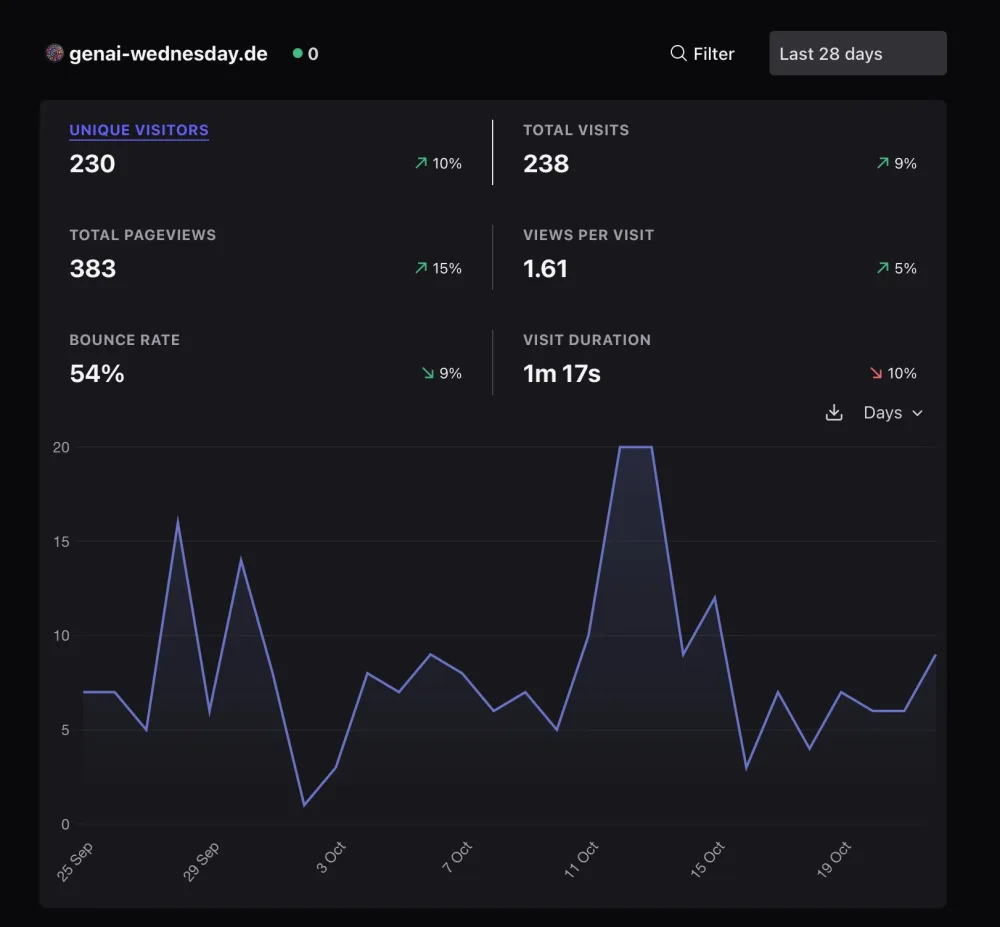
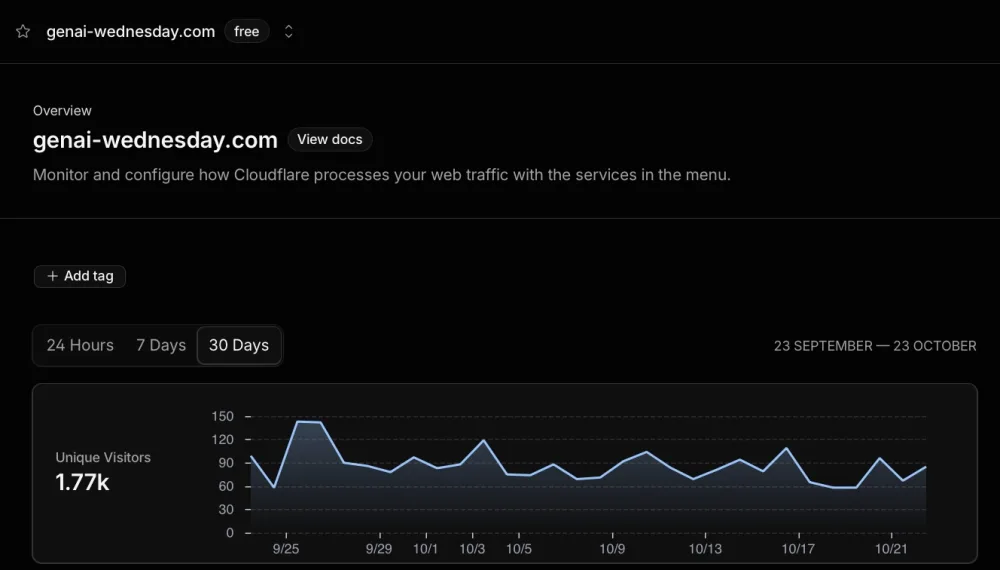
The two differ a lot, and neither is the true number. Cloudflare's documentation says its free-plan figures include crawlers and threats, and Plausible's script counts only the browsers that run it, so a visitor who blocks it is missed. That can account for part of the gap; the screenshots cannot show how much. Plausible says it counts a visitor once per day, from a hash that changes daily, and stores no IP address; a person who returns on another day counts again (its metrics definitions and data policy, read 23 October 2026). The comparison is also rough: the periods differ by two days, and the Cloudflare screenshot shows genai-wednesday.com, an address that forwards to genai-wednesday.de, the site Plausible counts.
Plausible is made by Plausible Insights OÜ in Tartu, Estonia (its imprint). Uku Täht started it in December 2018 and Marko Saric joined in 2020. It is open source, built and hosted in the EU, and funded by its subscribers (its about page, both read 23 October 2026).
Hosted by Plausible, the Starter plan for up to 10,000 page views a month costs 9 euros a month, or 9 US dollars where Plausible shows dollars, on monthly billing; yearly billing is 90 euros. A 30-day free trial needs no credit card (its pricing page, read 23 October 2026). You can also run it on your own server: the Community Edition is free, and you manage everything yourself (Plausible's self-hosting guide, read 23 October 2026).
There are two ways to count. By default a small script in the visitor's browser sends the visit to Plausible. In the optional server mode no script runs on the visitor's device: the site's Cloudflare function sends each page view instead. Server mode also counts visitors who block scripts, and it skips requests that do not look like a browser opening a page, which keeps out many crawlers and scripts (the function's code). In return it loses scroll depth and engaged time, it passes the visitor's IP address on to Plausible, and it uses the function's daily request allowance (the toolkit's guide).
There is also a third way: leave Plausible off and add nothing. Cloudflare's own counts, described above, stay, and with no analytics tool of your own there is no analytics consent to ask for; other features of a site can still need consent. The toolkit's privacy-page draft can say so, and your assistant removes its Plausible paragraphs. A site without a banner still needs its privacy page, an imprint in Germany and Austria, and a processing contract with Cloudflare (the toolkit's guide).
Plausible says it uses no cookies and no persistent identifiers (its data policy, read 23 October 2026). The toolkit's guide calls server mode, which reads nothing from the visitor's device, a stronger position, and not a way out of a review. Analytics is optional: it stays off until you switch it on.
No cookie banner*
* This is Plausible's own position (its data policy, read 23 October 2026), not legal advice. The EU data protection authorities' guidelines say that tracking by IP address alone can fall under the ePrivacy rule when the address comes from the visitor's own equipment, and that this does not by itself mean consent is needed (EDPB Guidelines 2/2023, paragraphs 54 to 56). Germany's data protection authorities say their guidance gives no general answer on whether audience measurement may be used without consent, and that an answer is possible at most for a precisely defined set-up and purpose (their guidance of November 2024, paragraphs 87 to 89; both read 23 October 2026). The authority of Baden-Württemberg says that server-side tracking without cookies can rest on legitimate interest and fall outside the German cookie rule, but only if the data are fully anonymised before they go to a tracking provider; swapping identifiers for hashes is not anonymisation, and neither is following a visitor beyond one session (its FAQ on cookies and tracking, answer 3.2, read 23 October 2026). German courts have awarded damages for tracking without consent: in a case about analysis cookies placed through other companies' websites (OLG Frankfurt, 11 December 2025) and in cases about the tools Meta offers companies for their websites (OLG Dresden, 3 February 2026; both read 23 October 2026). This page knows of no ruling on analytics without cookies. Ask your own adviser.
Where Keystatic fits
Not as a fourth place. Keystatic is an optional editing screen for someone who would rather fill in a form than talk to an assistant, chosen when the site is first built. In local mode, the one the toolkit sets up, you open the editing screen in your browser on your own computer. It writes text files (Markdoc, a Markdown dialect) into the same folder, and you send the change to GitHub as usual. The published site contains no Keystatic.
Keystatic is a Thinkmill project, made in Australia (Keystatic's site). Thinkmill builds software for other companies, and its own site gives its address as Sydney (Thinkmill's site, both read 23 October 2026).
A GitHub mode serves the editing screen from the published site and saves straight to GitHub, so nothing runs on the editor's computer. It needs a server part on Cloudflare, a GitHub App and stored secrets. The toolkit describes it but does not set it up.
Checks before anything goes live
A hook builds the site and runs the test suites before every push. GitHub runs them again on every
pull request and on pushes to main and production. In the recommended
two-stage setup, a change appears first on a preview address that search engines are told to
ignore, and one command, npm run ship, publishes it.
What enforces what. The hook can be skipped. The checks on GitHub report a
result; they block nothing by themselves. Whether GitHub also refuses a merge until a check passes
depends on a branch rule that the owner switches on. The toolkit's team setup describes it and says a
free plan allows it only for a public repository. On
the repository behind croftweaver.com it is on: a change reaches main only by a pull request that
passes the test and Cloudflare Pages checks, and the rule has no bypass
list (read from GitHub's settings on 22 October 2026). GitHub requires no passing check for the push that
publishes to production; only the hook runs, unless it is skipped.
What each suite checks, and what a pass does not prove.
What it costs
It is free to start: GitHub's free plan and Cloudflare's free plan, each with the limits above, as read on 22 October 2026. Croftweaver itself is MIT-licensed and charges nothing. Free here means free within those limits, and plans change.
Not free: your domain, at the price of whoever registers it; your AI assistant's own plan; and Plausible, if you switch it on. Its price, and the free edition you host yourself, are under Analytics.
What you can swap
The pages are static files, and any web host can serve them. The setup around them is written for Cloudflare Pages: the publish script, the previews, the headers file, the small function and, if you add it, Keystatic's GitHub mode. Another host means replacing those parts or doing without them.
Where a shop fits
A shop stays on its own platform, such as Shopify. Croftweaver builds the content next to it: guides, articles and landing pages that link to your products. It has no Shopify connection, and a cart, accounts or checkout need a server part that Croftweaver does not build.
Next step
The quickstart starts from nothing, and the test gate lists every suite. The code is on GitHub.